
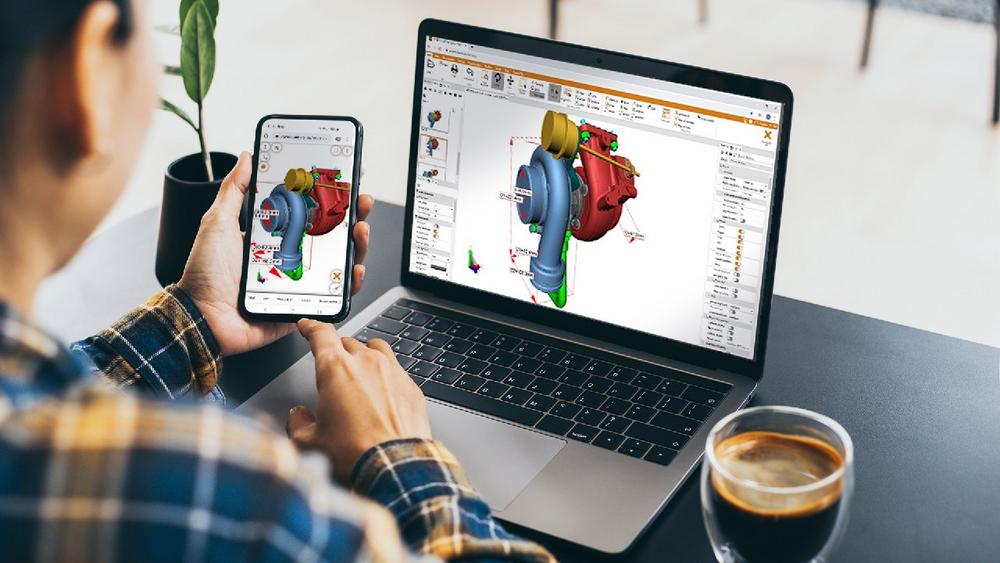
Tips for working more efficiently with 3D CAD visualization software
Intuitive operation: Efficiency without training
Software does not have to be complicated. Clear, intuitive operation allows even new users to be productive right away. KISTERS 3DViewStation was deliberately designed so that its functions are self-explanatory. Companies benefit from minimal training requirements and rapid integration into existing engineering processes.
Optimize user interface: Custom layouts for custom workflows
A well-structured interface saves time and reduces accidental clicks. KISTERS 3DViewStation is intuitive thanks to its Office-like ribbon interface. Users also benefit from being able to customize the layout to suit their personal working style and the functions they need. KISTERS 3DViewStation allows windows to be shown, hidden, moved, or undocked, for example. This significantly reduces the effort required for recurring tasks. At the same time, it simplifies the learning curve for new users.
Instead of manual searching: Use intelligent filter and selection functions
3D models are becoming increasingly complex. The larger the assemblies, the more important precise navigation becomes. Modern visualization tools offer powerful search and filter mechanisms for this purpose, making large CAD structures easier to manage.
With 3DViewStation, components can be found within seconds based on attributes, names, type, color, or any metadata. Whether filtering by production information (PMI), version, object type, and other criteria, or quickly locating a specific component, for example, using free text search within a pre-filtered group: users can use the intuitive and intelligent filter functions to go directly to the relevant components without any detours – a decisive advantage for large CAD structures. In addition, the rule engine is available for more complex searches, supporting the execution of Boolean expressions.
The selection of individual parts or assemblies is also flexibly possible. Visual selection with immediate highlighting is performed by clicking directly in the model area or structure tree, or by dragging a rectangle. Interactive multiple selection as in Windows Explorer, neighborhood search, or reverse selection are just a few of the many other selection options available in 3DViewStation.
Structuring information: Create and manage views and markups in an organized manner
The proper documentation and communication functions are crucial for technical reviews and coordination. KISTERS 3DViewStation provides 3D markup tools including text, circle, rectangle, and freehand. It is also helpful to clearly structure relevant perspectives and markups. 3DViewStation offers the option of organizing views into groups, thereby significantly simplifying review meetings, inspection procedures, and change processes. Teams maintain an overview at all times and can make decisions more quickly.
Save time through performance and automation
Load large amounts of data in seconds: In many projects, the loading time determines how smoothly a review or analysis process runs. 3DViewStation is designed to open even very large CAD models within a few seconds. This reduces waiting times and improves responsiveness and user acceptance. One example is a company with around 2,000 employees, where waiting times alone added up to around USD 2 million per year. By using KISTERS 3DViewStation, these waiting times and the associated costs were significantly reduced.
Those who need the shortest possible loading times use the KAS batch tool, which automatically updates the lightweight visualization data after a change in the CAD data. This means that they are immediately available to users without delay. The use of KAS leads to considerable efficiency gains. For example, a 5 GB Catia assembly that takes 5 minutes to load in native load mode can be loaded in just 1 second after conversion to 3DVS format – without any loss of information.
Flexible, device-independent, and mobile: 3DViewStation WebViewer
With WebViewer, 3DViewStation is also available as a fully browser-based solution—no installation required, on any device, anywhere. This flexibility supports modern working models, global collaboration, and the concept of a continuous digital thread: all relevant stakeholders can access up-to-date data at any time, whether on a desktop, tablet, or smartphone.
Make targeted use of software documentation sources
If uncertainties or questions arise during operation, users benefit particularly when the software provider offers well-maintained documentation sources. Users of Kisters 3DViewStation can access both the descriptions of the currently used function available in the application itself and the generally accessible online help center. This can also be accessed directly from 3DViewStation using a search field.
Conclusion: Efficiency comes from powerful tools – and thoughtful use
The right approach to 3D CAD visualization solutions can make the difference between slow, complex processes and efficient, responsive engineering. With its combination of high performance, intuitive operation, flexible customizability, comprehensive automation options, and more than 180 functions, KISTERS 3DViewStation offers the ideal conditions for efficiently designing the digital thread and effectively accelerating development processes.
About 3DViewStation
KISTERS 3DViewStation is continuously enhanced in response to customer needs and requirements. It is available as a Desktop, HTML5 WebViewer and VR Edition product versions plus the online collaboration tool VisShare. All product offerings can be integrated with a PLM, ERP or other leading management system as well as service and spare part applications. KISTERS 3DViewStation provides all necessary APIs for your development team. For cloud, portal and web solutions, there is a HTML5-based WebViewer solution available, which does not require client installation. All file formats can be used in combination with the intelligent navigation and hyperlinking features to address the needs of complex integration scenarios.
With more than 25 years of success in the market as a provider of superior visualization solutions from desktop to mobile, KISTERS has become the CAD viewer tool of choice within the 3D visualization industry. The company’s clients range from small firms to well-known multinationals, comprising more than 3,000 customers and over 200,000 installations worldwide. The 3DViewStation’s easy-to-use interface is suitable for all user groups and 100% customizable to everyone’s specific requirements.
KISTERS AG
Pascalstraße 8 + 10
52076 Aachen
Telefon: +49 (2408) 9385-0
Telefax: +49 (2408) 9385-555
http://www.kisters.de
Demand Generation Marketing Manager | KISTERS Visualization Technologies
Telefon: +49 (2408) 9385-327
E-Mail: andrea.beaujean@kisters.de


Das könnte dich ebenfalls interessieren

Altairs globale Studie zeigt wachsende Bedeutung der Digital Twin Technologie im Banken-, Finanzdienstleistungs- und Versicherungssektor
Die Zukunft ist digital, elektrisch und intelligent